Batch mode
Batch Mode retains analysis results from multiple files in a single results table, allowing the same analysis to be run and compared across a series of recordings.
When Batch Mode is off, loading a new file will clear all analyses from the previous file.
Turning Batch Mode on (File › Batch Mode › On) causes a file’s analysis results to be saved in the Table tab results table. If analysis is run on a file then a new file is loaded, all results from this new file are appended to the end of the table. For each file, re-analysis will overwrite the results for that file only (unless a Data Tools method has been run between the two analyses in which case they are both displayed).
It is not possible to mix current clamp and voltage clamp recordings in Batch Mode. To load a voltage clamp file after a current-clamp file (or vice-versa) it will be necessary to turn off Batch Mode (which will clear the results table on new file load).
In batch mode, Records to Analyze settings will not be changed when the next file is loaded (by default, they are set to the start and stop times of the new file).
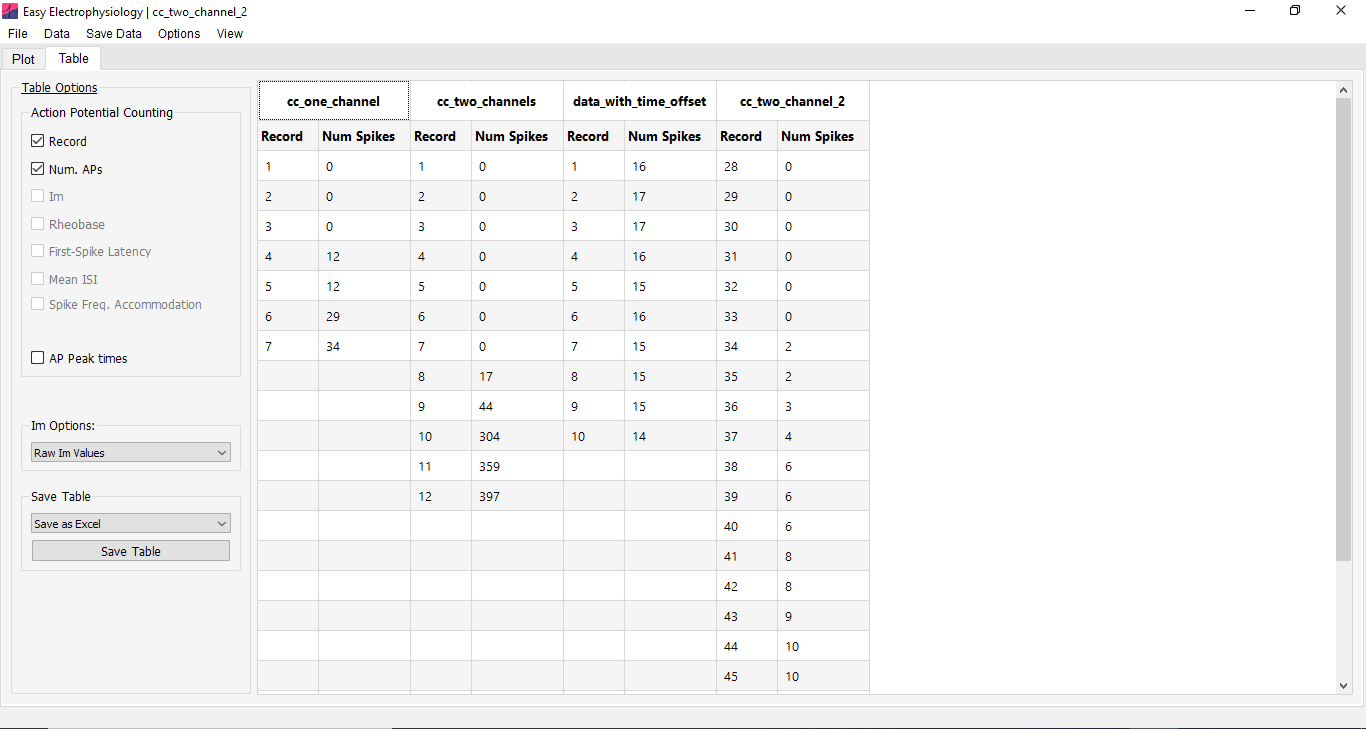
In Batch Mode analysis can be deleted from the analysis results table by right-clicking the first row of the table and selecting Delete analysis.