Reshape records
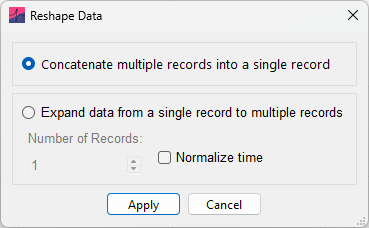
Selecting Concatenate all records into a single record will combine multiple records into one long record. Note that where recorded time intervals between records are not continuous, because they reflect gaps in the recording schedule (e.g. Record 1, \(0\)–\(2\ \mathrm{s}\), Record 2, \(3\)–\(5\ \mathrm{s}\)), they will be made continuous (e.g. record 1 and record 2 would be concatenated into a single record between time points \(0\)–\(4\ \mathrm{s}\)).
Alternatively, a single-record dataset can be split into multiple records by selecting Expand data from a single record to multiple records. This is useful for improving performance when plotting long records, or handling .abf files exported from other software (e.g. Igor or WinWCP) that automatically concatenate all records.
Long single record files (containing millions of datapoints) can slow down the software due to the overhead associated with displaying the data on the graph. A simple workaround is to reshape the single record into multiple, smaller records.
This may affect Events analysis. When the resulting record times are non-contiguous, inter-event intervals used for frequency cumulative-probability and histogram plots are not calculated across record boundaries. If all \(N\) records contain events, this removes \(N - 1\) intervals. Intervals continue to be calculated across records when their times are contiguous. In large files with hundreds or thousands of events, omitting these boundary intervals is unlikely to meaningfully affect the results.
The option is provided to normalize time when reshaping records (so every record has the same time period, see Normalize Time).
If the number of samples does not divide without remainder into the number of records, a warning will show and the remainder samples will be removed from the end of the single-record before reshaping.